


SpoofCard - Privacy Protection
4.01.17K Reviews
App Specs
- Version
- 7.1.3
- Updated On
- License
- Free
- Downloads
- 500,000+
- Developer
- SpoofCard
- Categories
- Communication
- Platform
- Android
Screenshots
 Analysis by AppCompare
I’d start by asking what “privacy” means in the calls you actually make. Sometimes you simply want to avoid giving your everyday number to a stranger; other times, you need a separate line for work, or you want to stop using your personal contact details in a one-off conversation. Those are different problems, and the best choice depends on whether you need occasional discretion or a stable, ongoing way to be reachable.
SpoofCard is built around placing calls and sending texts without displaying your actual number, so it is most relevant when you want a layer between your personal line and a particular conversation. Spoofing also carries responsibility: a recipient should not be misled into trusting you because a number appears familiar. I’d use the app to protect my own contact details, not to impersonate someone or evade a person who has asked not to be contacted.
Choose the kind of privacy you need
Before installing, I’d think through how often I expect to use it and what I need the other person to see. For a single marketplace inquiry, a privacy-focused calling app may be more convenient than sharing a personal number. For a job search or a small business, though, a dedicated second line can be easier to manage if you need people to reach you repeatedly and recognize the same contact identity.
That distinction is useful because hiding a number for a conversation is not the same as building a long-term work contact. If a client needs to call back next week, consistency matters as much as privacy. If you only need to ask about an item for sale, a temporary layer may be enough. I’d decide which situation describes me before spending time setting up another communication routine.
Where its approach can be useful
A realistic example is arranging to collect a used item from someone you do not know. You may need to coordinate a time and location, but there is little reason to give a stranger the same number you use for family and friends. A separate calling and texting route can keep that exchange apart from your usual contacts. I would still share only what is necessary, meet sensibly, and stop the conversation if anything feels wrong; number privacy is not a substitute for ordinary caution.
It can also suit someone who handles occasional inquiries for a side project but does not want every first-time contact to have their personal number. The trade-off is that an app-based route becomes another place to check and another step to remember. If you use it only once in a while, make a note of which number or contact method you used so a legitimate reply does not look unfamiliar later.
How it differs from ordinary calling options
The usual phone dialer is the simplest choice when you are comfortable using your normal number. It keeps your routine familiar, but it does not create the same separation between a personal line and a private conversation. A second SIM or a dedicated work number may be a better fit when you need a stable identity over time; those options bring their own setup and management decisions, rather than making occasional private calls the main task.
Worth Reading Before You Choose

EA SPORTS FC Mobile 26 Is a Bigger Football Game, but It Takes Time

Flipboard Shows What News Apps Must Do Beyond the Feed

Switching to Android Auto Means Rethinking Your Driving Routine

Google Calendar Makes a Crowded Week Easier to Manage

Ludo King Makes the Most of the Minutes Between Plans

Baby Panda World Brings Quick Play to Modern Phones, but Its Game Library Feels Busy
Messaging services can be convenient when both people already use the same service, but they are not interchangeable with a call or a text sent through a number-based route. For a conversation with someone who expects a phone call, an app focused on calls and texts may match the task more closely. I would choose the channel the other person can reliably use, while avoiding the assumption that a different displayed number makes a conversation anonymous or impossible to trace.
There is also an important trust trade-off. A changed caller ID can protect your own number, but it can confuse the recipient if they do not recognize what is calling. I’d keep the opening clear about who I am and why I’m calling, and I would not use a familiar person’s number or anything intended to make the recipient believe I am someone else. Privacy is most defensible when it limits unnecessary exposure without creating a false identity.
Costs, setup, and everyday friction
The app is free to install, but it includes in-app purchases priced from $4.99 to $99.99 per item. That means I would check what a purchase covers inside the app before relying on it for a regular calling habit. A free download is not the same as unlimited free use, and the range of purchase prices makes it sensible to start with a small, specific need rather than assume the service will suit heavy use.
If I were comparing it with my normal carrier service, I’d consider both the purchase cost and the extra steps involved. You may need to open a separate app, select the calling or messaging route, and keep track of the conversation there. That can be worthwhile for privacy-sensitive contacts, but it is needless friction if all you want is a standard call to someone who already has your number.
For a first test, I’d choose a low-stakes, appropriate conversation with someone who understands why I am using a separate route. Confirm that the person can respond as expected, and make sure you know where replies will appear before using it for anything time-sensitive. This small check is more useful than assuming every communication app behaves exactly like the phone’s built-in dialer.
Who should look elsewhere
I would skip this kind of tool if my goal were to deceive a recipient, bypass their boundaries, or make a call seem to come from a trusted organization. It is also not the obvious choice if I need a permanent public business number, a shared team inbox, or a simple way for friends to reach me every day. In those cases, a clearly identified second line or a standard business communication service is easier for everyone to understand.
People who rarely make calls or texts to unfamiliar contacts may not get enough value from adding another app to their routine. Likewise, if a contact needs dependable callbacks over a long period, I would favor a consistent number that I can maintain and answer. Spoofing is a narrow privacy tool, not a replacement for every feature of a phone plan or a dedicated professional line.
There are practical questions worth settling before depending on it: whether the person can reply through the same route, how you will recognize their response, and what the app’s purchase options mean for your expected use. I would check these in the app and test the workflow before arranging an urgent conversation. For sensitive matters, I would also consider whether a phone call is the right channel at all, rather than treating caller-ID changes as complete protection.
Have you ever found yourself wishing for a bit more privacy when making phone calls? Well, I recently stumbled upon an app that could be your new best friend: SpoofCard. This app promises to keep your phone number private while still allowing you to make calls and send texts. Intrigued? Let’s dive into what makes this app a potential game-changer in the world of privacy protection.
What is SpoofCard?
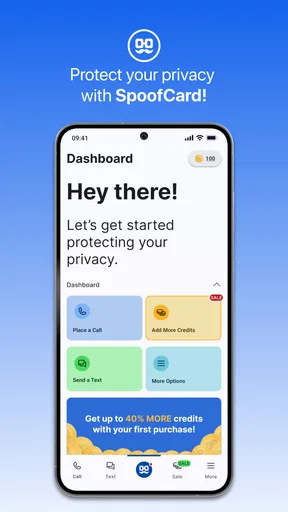
SpoofCard is an app designed to provide an extra layer of privacy when you’re making phone calls or sending messages. It allows you to call and text without revealing your actual phone number. This can be a lifesaver in situations where you need to maintain your privacy, like online dating or business communications.
Features Worth Noting
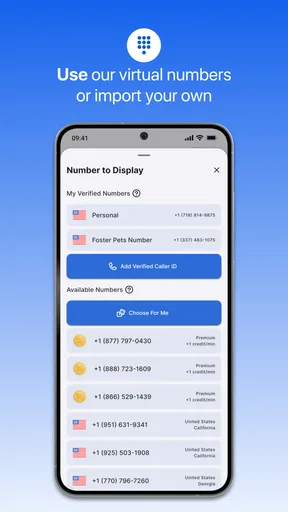
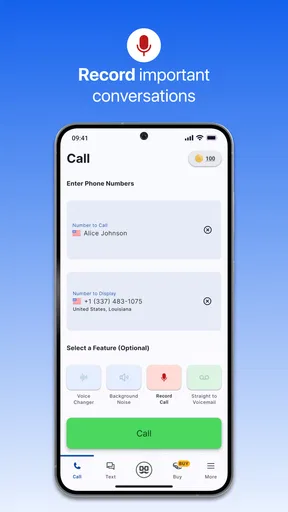
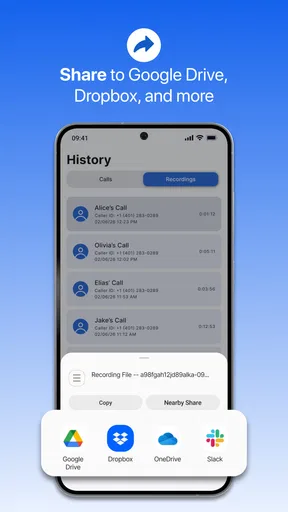
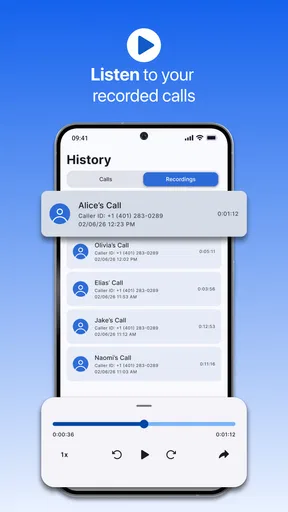
First off, the app lets you choose the number that appears on the recipient’s caller ID. That’s right, you can select any number to display, which can be a fun prank or a serious privacy measure. But that’s not all. SpoofCard also offers call recording, voice changing, and even group calling options. Pretty neat, huh?
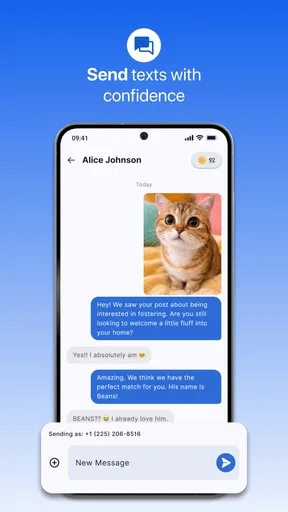
Another feature that caught my attention is the ability to send text messages from a different number. This can be particularly helpful if you need to communicate with someone without revealing your real number. It’s like having a burner phone right on your device.
Using SpoofCard on Android and iOS
The app is available for both Android and iOS, which is a definite plus. Installation is straightforward, and the interface is user-friendly. You don’t need to be a tech wizard to get started. I found the setup process to be quick, and I was making calls in no time.
One thing I appreciated was the clarity of the instructions. Often, apps that deal with privacy can be a little daunting, but SpoofCard makes it easy to understand what you’re doing and how it impacts your privacy.
Performance and Reliability
In terms of performance, I was pleasantly surprised. The call quality was clear, and there was no noticeable lag. The app performed well under different network conditions. For anyone worried about reliability, rest assured that SpoofCard delivers on its promises.
However, it’s worth noting that call and text spoofing should be used responsibly. The app has built-in warnings about misuse, which is a good reminder to respect the privacy of others while safeguarding your own.
Is SpoofCard Worth It?
So, is SpoofCard worth the download? If you’re someone who values privacy and wants to keep your personal number under wraps, absolutely. The app provides a range of features that make it more than just a novelty. It’s a practical tool for anyone looking to maintain privacy without sacrificing communication.
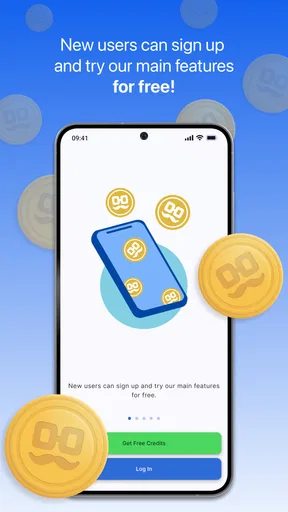
While it’s not a free app, the pricing is reasonable, especially considering the peace of mind it offers. You can purchase credits within the app, which are then used to make calls and send texts. This pay-as-you-go model means you’re not tied into a subscription, giving you flexibility in how you use the service.
In conclusion, SpoofCard is a solid choice for anyone needing to protect their phone number. It’s easy to use, performs well, and offers a suite of features that enhance privacy. Whether you’re concerned about privacy for personal or professional reasons, this app is definitely worth checking out.
Who it suits, and what to expect
SpoofCard is a communication app from SpoofCard, available at no upfront download cost. It has an average rating of 4.3 from around 3.8 thousand ratings, and more than 500 thousand installs. Those figures suggest that plenty of people have tried it, but I would treat popularity as context, not proof that it fits every privacy need. Its Everyone content rating is broad; responsible use still depends on the person making the call.
The app was released on January 28, 2020, and its current version is 5.8.4, with Android 8.0 as the minimum operating system requirement. I’d check compatibility before planning to use it on an older device. If you are choosing between this and a second number service, the key question is whether you want occasional separation for selected conversations or a durable number that becomes part of your everyday identity.
The less obvious benefit of an alternate caller ID is not simply concealment: it can help you keep boundaries between different parts of life. For example, a person selling handmade items might use a separate route for initial order questions, then move established customers to a more consistent contact channel if ongoing support becomes necessary. That staged approach avoids exposing a personal number at the first inquiry while preserving a reliable way to communicate once a relationship is established.
Another useful habit is to decide in advance how you will end the communication. If you are contacting someone for a one-time task, keep the exchange focused, avoid implying that the alternate number is your permanent line, and do not leave the other person uncertain about how to reach you if a genuine follow-up is required. That small bit of expectation-setting makes privacy less confusing for both sides.
A considered recommendation
My recommendation is for people who have a clear, occasional reason to keep their personal number out of a call or text exchange and who are willing to use the feature honestly. It is less compelling if you want a fully separate identity for daily work, need a no-cost ongoing line, or prefer all communication to stay inside the standard phone app. In those cases, a stable second number or your existing carrier setup may be more straightforward.
Because the download is free but in-app purchases range from $4.99 to $99.99 per item, I would not judge affordability from the install button alone. Look at the purchase choices and match them to the amount of calling or texting you realistically expect. For occasional use, that check may be enough to make a sensible decision; for frequent use, compare the total ongoing expense and convenience with a dedicated second-line option before committing.
Pros
- Easy to use interface for all users.
- Allows number masking for privacy.
- Offers recording feature for calls.
- Multiple number options for flexibility.
- No ads to disrupt user experience.
Cons
- Limited free call minutes available.
- Requires internet for some features.
- Occasional call quality issues.
- Subscription needed for full access.
- Not available in all countries.
FAQs for SpoofCard - Privacy Protection
What is SpoofCard and how does it work?
SpoofCard is an app designed to protect your privacy by allowing you to make phone calls with a different caller ID. It enables you to mask your true phone number, providing anonymity and security during calls. This can be particularly useful for business purposes or when contacting people you don't want to share your personal number with.
Is SpoofCard legal to use?
Yes, SpoofCard is legal to use, provided it's used responsibly and ethically. Users must adhere to local laws and regulations regarding caller ID masking. It’s important not to use the app for fraudulent activities, harassment, or any other illegal purposes, as misuse can lead to legal consequences.
What are the key features of SpoofCard?
SpoofCard offers several features including caller ID masking, call recording, and voice changing. It also provides options for sending spoof text messages. The app is designed to offer both privacy and functionality, making it a versatile tool for personal and business communications.
Are there any limitations to using SpoofCard?
While SpoofCard offers many privacy features, it may not work with all phone carriers or in all countries. Additionally, users might experience limitations based on subscription plans, such as a restricted number of calls or texts. Checking compatibility and plan details before purchase is recommended for optimal use.
How secure is my information with SpoofCard?
SpoofCard prioritizes user privacy and employs encryption to protect your data. However, like any app, there is a risk of data breaches. Users are encouraged to use strong passwords and be cautious about sharing sensitive information to enhance security. Always review the app’s privacy policy for detailed information.


